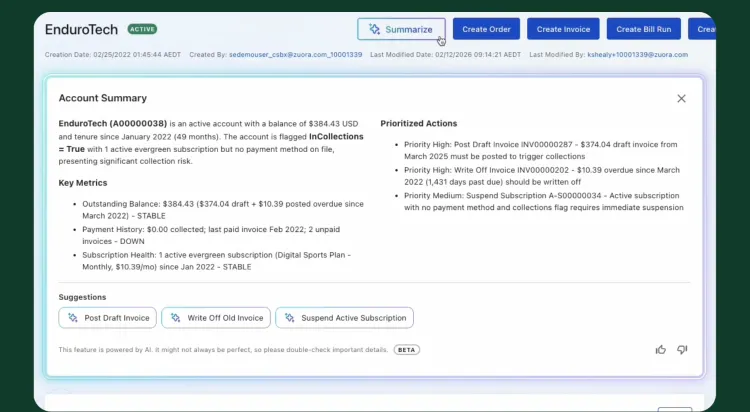
Before Zuora AI, Kaela and her team had to identify the right report or query, navigate across Zuora, manually build filters and fields, and then review the results just to answer routine billing questions. Now they use Zuora AI every day for reporting, account summaries, and bill run workflows, cutting reporting time by roughly 70% and getting to the real review much faster.
“Reporting used to take a very long time. When you can do it in Zuora AI, you are saving yourself a lot of time. It goes from hours to minutes.”
Challenges and opportunities
Kaela Gentry is a Manager on Zuora’s Billing Operations team. She keeps billing moving, exceptions under control, and downstream teams informed. Her day is shaped by invoice questions, bill run validation, usage and subscription checks, account-level investigation, end-of-month validations, data hygiene work, and helping other teams understand what happened and what should happen next.
What Kaela and her team are trying to make easier:
- Investigating billing discrepancies before they become customer issues
- Pulling together complete account and invoice context without manual stitching
- Turning recurring reporting, validation, and bill run work into faster, repeatable workflows
- Spending less time gathering data and more time resolving exceptions
- Reducing dependence on IT for routine reporting and troubleshooting questions
Why Kaela’s team needs Zuora AI:
- Fast access to account, subscription, invoice, payment, and workflow context
- Fewer manual reporting and reconciliation steps
- Help translating operational questions into useful analysis
- A faster path from investigation to action
- Self-serve answers to questions they previously had to route to IT or another tool
Where Zuora AI helps most for Billing Operations
For Billing Operations, Zuora AI is especially useful in the moments where speed, context, and traceability matter most.
1. Invoice and bill run investigation
Quickly trace why an invoice billed a certain way, which bill run created it, what dates and charge details were used, and which fields explain the result.
2. Account-level billing summaries
Pull together active subscriptions, open invoices, pending billing, payment history, and days past due so the team can understand account health without manually hopping across records.
3. Reporting, validations, and data hygiene
Use natural language to run existing reports, support end-of-month validations, investigate account subscription history, and answer day-to-day operational questions without starting from scratch every time.
4. Usage billing troubleshooting
Identify usage records that were not processed, validate whether expected usage made it into billing, and narrow down where the issue likely sits before escalating.
5. Recurring operational workflows with runbooks
Turn repeatable work like bill runs into more streamlined workflows, saving steps on recurring processes while keeping human review in place.
6. Self-serve troubleshooting
Ask Zuora AI the kinds of questions the team would normally send to IT, including interpreting error codes and explaining what happened and how to fix it.
A workflow before and after Zuora AI: Investigating a billing discrepancy
This is one of the most repeated and time-sensitive workflows in Billing Operations.
Before Zuora AI
- A question (e.g., “Can you explain this proration credit to me?”) comes in from Finance, Support, or a customer-facing team
- The Billing Ops user figures out which objects, records, dates, and fields might matter
- They navigate across accounts, subscriptions, invoices, usage, and payment history
- They build or request a report, query, or export
- They reconcile what they find and document the answer
- Then they decide what action should happen next
With Zuora AI
- They ask the billing question in natural language
- Zuora AI finds the relevant record context across Zuora
- The user reviews the answer, supporting details, and suggested next steps
- They refine the question if needed
- They export, document, or hand off the result with much less manual stitching
- Human judgment still validates the outcome before action is taken
What changes is not just speed. The work becomes easier to start, easier to explain, and easier to repeat. More importantly, the team spends less time on setup work and more time on the part that actually needs judgment: reviewing results, reconciling issues, and moving the work forward.
“AI is helping Billing Operations move from reactive problem-solving to more proactive process improvement.”
How Kaela recommends getting started
Kaela’s team did not start with advanced workflows. They started by using Zuora AI for the kinds of questions they would normally answer through manual reporting, cross-checking multiple screens, or sending to IT. For other Billing Operations teams, her advice is to begin with the workflows where you spend the most time gathering context before you can actually review or act.
- Start with a summary of a specific account so you can quickly gather the full picture before digging deeper.
- Then get familiar with the investigation side of invoices and subscriptions. Zuora AI does a strong job explaining invoice status, days past due, and related billing context.
- If reporting is a big part of your work, try asking Zuora AI to run an existing report so you can see the time savings right away. You can also export the results once you have what you need.
- Look at runbooks for recurring processes. Kaela’s team uses them not only for bill runs, but also for a month-end validation that runs two reports and compares the results as part of close.
- Set up controls based on your approved audit controls so the team can use Zuora AI with more confidence. If someone tries to take an action they should not, Zuora AI can stop them and point them to getting approval outside the system.
- Use Zuora AI for the kinds of questions you would normally send to IT or another AI tool, especially when you need help understanding what happened or how to fix an issue.
- If you hit a subscription or billing error, try pasting the error code into Zuora AI and asking what happened and how to fix it before opening an IT ticket.
- Use it to understand the mechanics of Zuora Billing itself. Kaela’s team has used Zuora AI to investigate odd invoice behavior, understand what a data query is actually doing, and improve reporting and validations.
- Include known identifiers like invoice numbers, account names, subscription IDs, dates, or bill run IDs when you have them.
- Use follow-up questions to refine the result instead of starting over.
- Ask for supporting records and fields or a report export, not just a summary, so you can validate the answer quickly.
- If a proposed action is involved, review it carefully before confirming.
Prompts Kaela would start with
- Summarize account [account name] and show me active subscriptions, payment history, invoice history, and number of days past due.
- Help me investigate invoice [invoice number] and explain its status and why it is past due.
- Which bill run created invoice [invoice number], and what fields confirm that?
- Run [existing report name] and prepare the results for export.
- What runbook could I build for this recurring bill run process?
- Explain this subscription or billing error code and how to fix it.
These kinds of prompts work because they map directly to how Billing Operations teams actually look for help: under pressure, with a specific task in mind, and with a clear problem to solve.
Why this matters for Billing Operations
Billing Operations teams do some of the most important but least glamorous work in the stack. When they have to spend too much time gathering context, building manual reports, or chasing down answers across systems, the cost shows up as slower response times, more exception handling, and less room for higher-value process improvement.
Zuora AI helps shift that balance. It gives Billing Operations a faster path from question to context, and from context to confident next step, while keeping the user in control.
Next steps
Try one of the prompts above in Zuora AI the next time a billing question lands on your desk. Start with one repeated workflow, validate the answer against the records you trust, and build from there.
Learn more
Close aged invoices faster without losing auditability with AI that assesses eligibility, recommends write-off amounts and reason codes, and produces an exportable rationale for human-approved execution with AI-enabled invoice write offs.
Zuora AI in Action: Invoice Write-Offs in Context
Explore how Zuora AI automates invoice write-offs in context, helping finance teams reduce manual work, improve cash application accuracy, and gain real-time insights into subscription revenue risk.